Styling XML with CSS
Learn how to style XML documents with CSS and link an external stylesheet through practical examples.
11.05.2015 · 1 min read
You can make XML documents easier to read by styling them with CSS. To link an external CSS file, use the following instruction:
<?xml version="1.0" encoding="UTF-8"?>
<?xml-stylesheet type="text/css" href="style.css"?>
After the XML declaration, we add the xml-stylesheet instruction and point href to style.css.
Now let's create a file called library.xml and style its content with style.css.
First, create library.xml and add the path to the CSS file.
<?xml version="1.0" encoding="UTF-8"?>
<?xml-stylesheet type="text/css" href="style.css"?>
<books>
	<book isbn="9759954949">
		<title>Yunus Emre Divani</title>
		<author role="Editor">Selim Yagmur</author>
		<language>Turkish</language>
		<edition>8</edition>
		<date>
			<year>2014</year>
			<month>04</month>
			<day>01</day>
		</date>
	</book>
	<book isbn="9753386203">
		<title>Risaletun-Nushiyye Yunus Emre</title>
		<author role="Translator">Prof. Dr. Umay Turkes Gunay</author>
		<language>Turkish</language>
		<edition>3</edition>
		<date>
			<year>2009</year>
			<month>01</month>
			<day>01</day>
		</date>
	</book>
</books>
Now let's prepare style.css.
books {
  padding: 10px;
}

book {
  display: block;
}

book title {
  color: blue;
  font-size: 20px;
  display: block;
}

book author,
language,
edition,
date {
  display: block;
  margin-left: 10px;
}
After applying the CSS, the XML document will look like this:
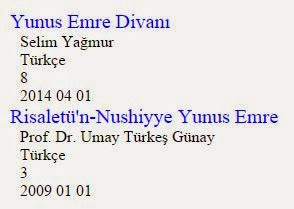
Without CSS styling, the same XML would look like this: